From 90 minutes to institutional memory.
One workshop captures how you think. One chat interface lets your team ask it anything. One weekly habit keeps it accurate. Here is exactly what happens at each stage, what you and your team see, and how long each one actually takes.
Put what you know in one place
A structured workshop maps out how you decide exceptions, escalation rules, and tone guidelines.
Staff get answers without asking you
Team members query the assistant in plain English and get cited replies in your company's own voice.
Refine every week
Land recent bot answers in your review queue to mark correct, rewrite, or sharpen underlying principles.
Turn documents into training and certificates
Choose a named Skills Framework competency, and it drafts the lessons and quizzes for you to review. Staff who pass get a certificate of completion.
Scale across the firm
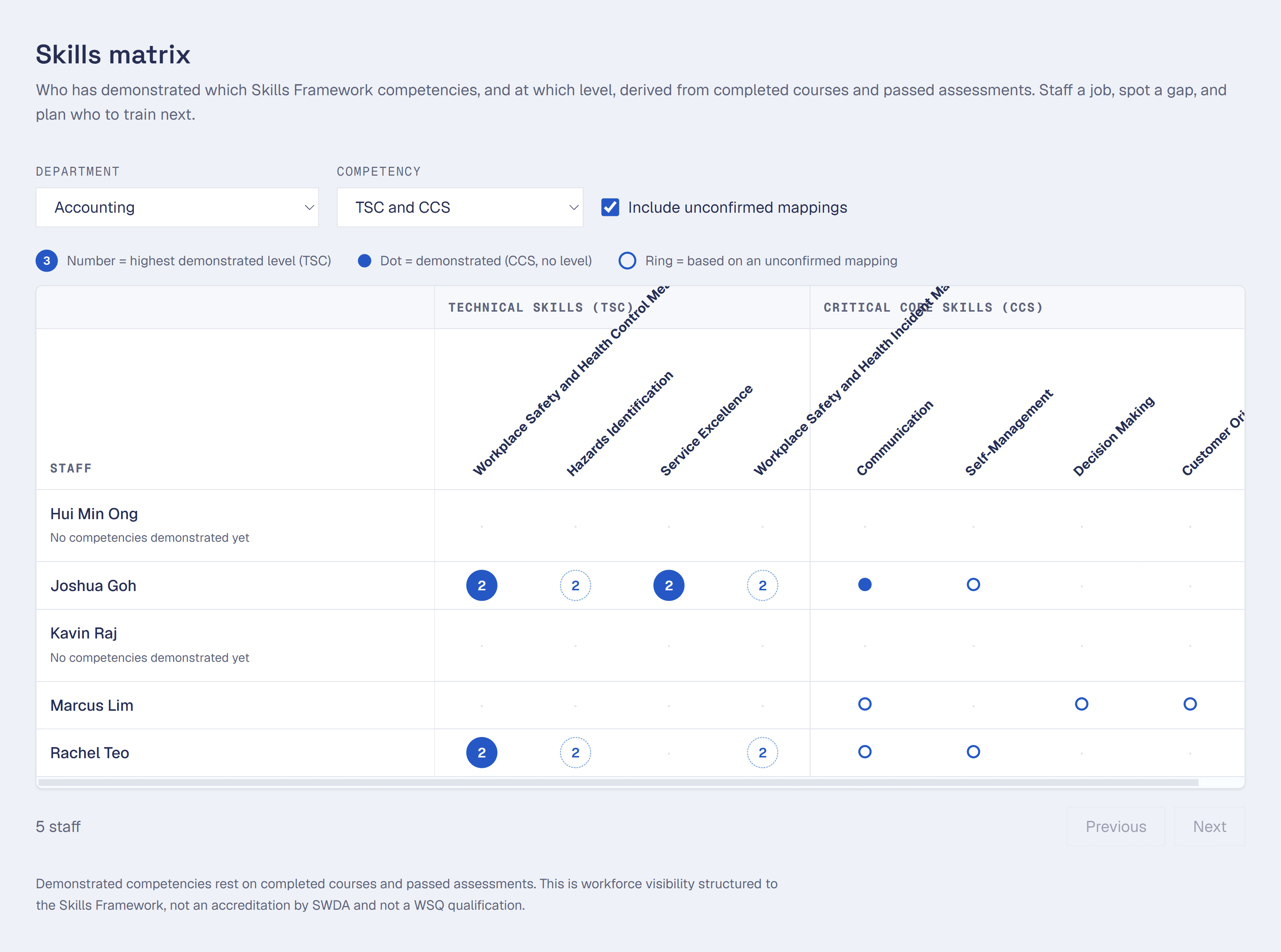
Departmentalize your workspaces and monitor overall progress from the live skills matrix.
Product screens on this page show sample workspaces built to demonstrate Decisionlore. They are not paying customers.
Put what you know in one place.
90 minutes, plus about a week to upload documents
A structured workshop walks you through how you decide things: pricing exceptions, client-fit calls, escalation rules, the phrases you'd never let a staff member say to a client. Micro plans run this as a self-serve, in-app wizard. Starter and Pro each include one facilitated workshop a year, where someone runs the session with you instead of you filling in a form alone.
Alongside the workshop, you upload what you already have: SOPs, manuals, policy docs, past client emails that show how a decision actually went. Each document is parsed, chunked, and embedded so it becomes searchable knowledge, not just a file sitting in a folder.
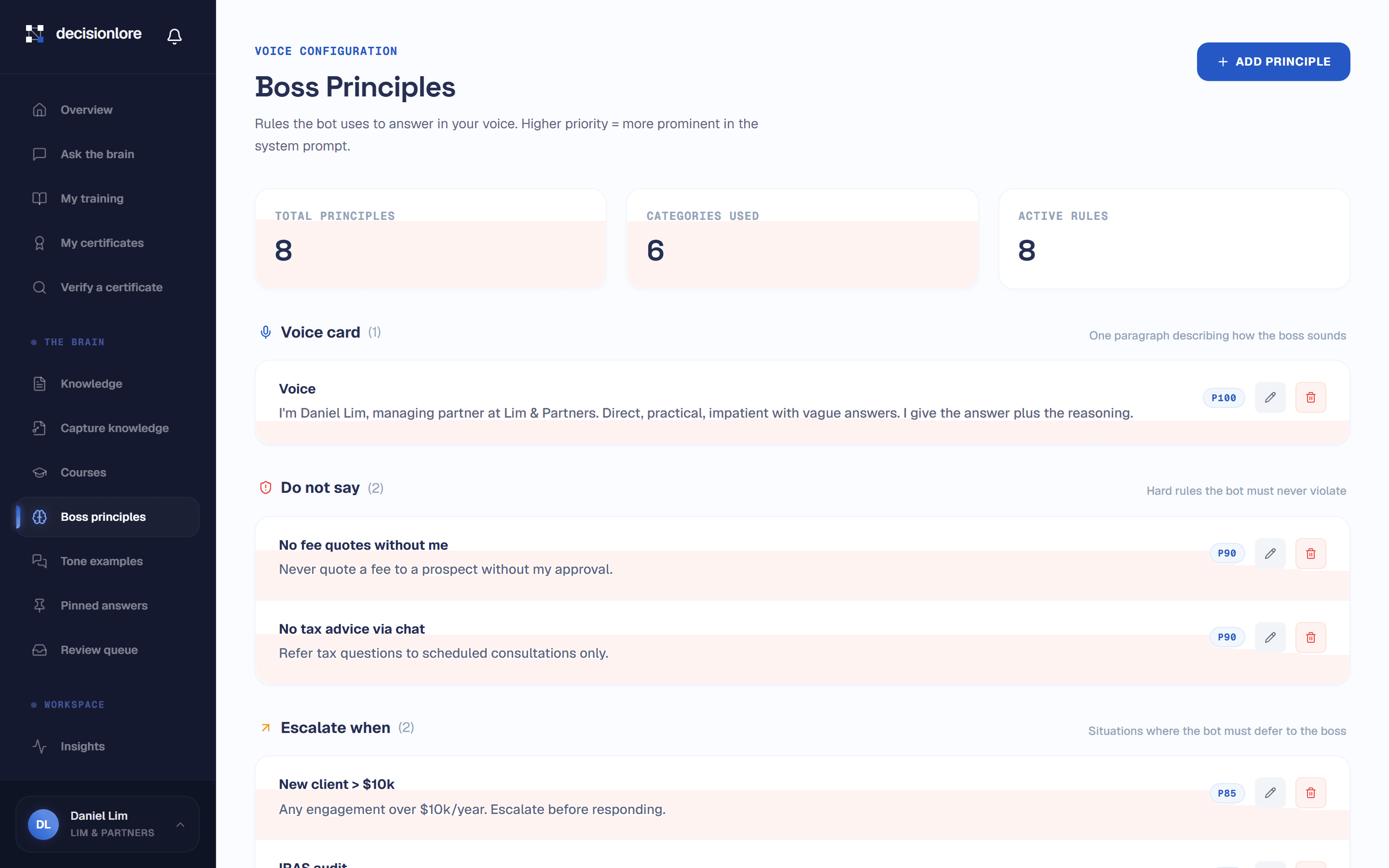
Boss principlesthe rules the bot uses to answer in your voice, ordered by priority. The highest-priority rule wins when two principles conflict.
Tone examples10 to 15 real question-and-answer pairs showing how you respond, used as few-shot examples so answers sound like you, not a generic assistant.
Knowledge baseevery SOP, manual, and policy document you upload, parsed, chunked, and embedded so it's queryable by anyone on the team.
Answers that cite their source and know when to stop.
Seconds per answer, on demand
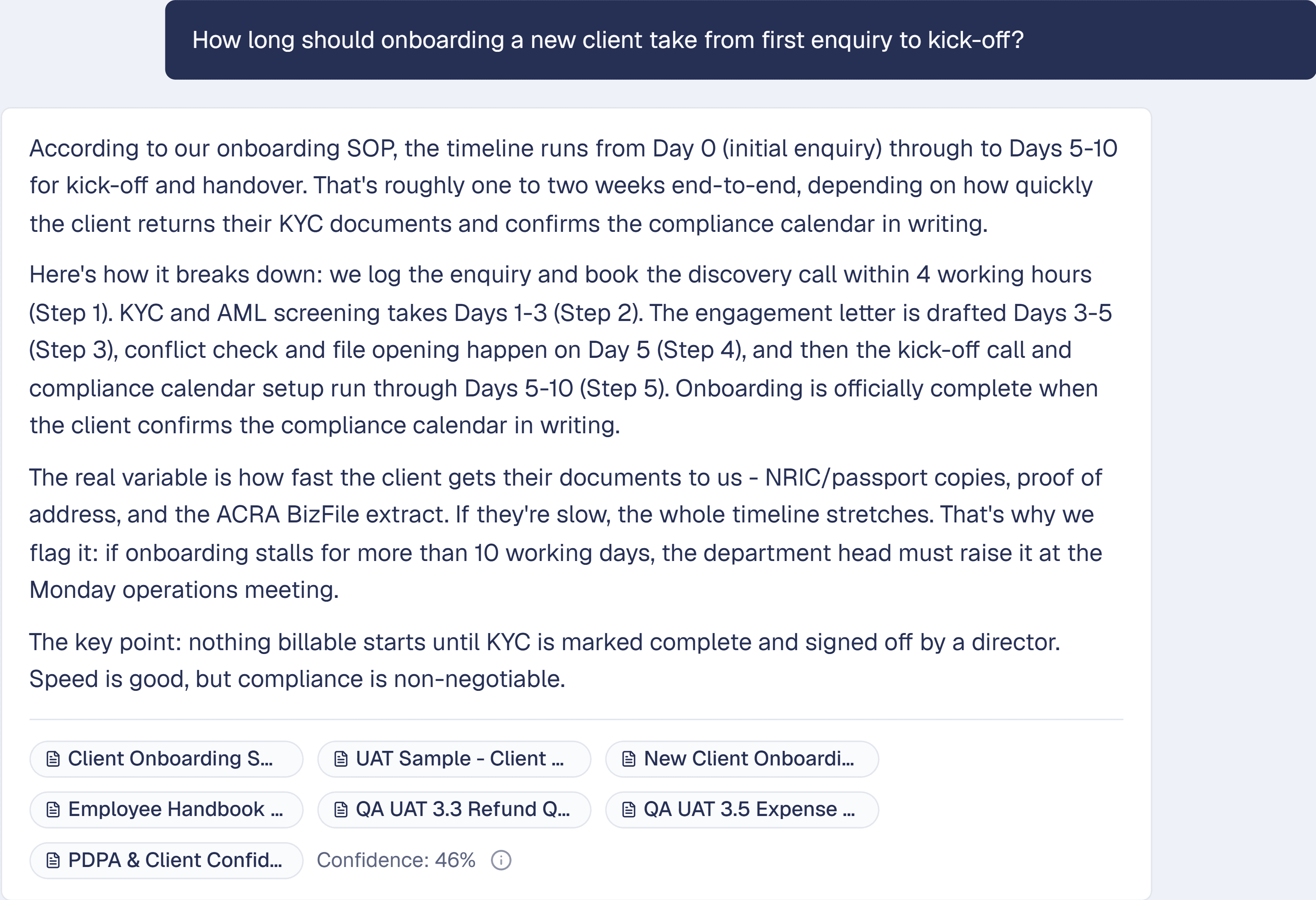
Staff ask questions the same way they'd ask a colleague, in the Decisionlore chat. The bot answers in your voice, using the principles and documents captured in the workshop.
Before an answer ever reaches a staff member, it runs the same five-point check a compliance officer would: cited to a source document, checked against your principles, screened by your do-not-say rules, escalated to you when confidence is low, and logged to an immutable audit trail. Nothing ships unchecked.
Ask the brainthe core chat surface where staff ask anything about how things work here, and the bot answers in the boss's voice.
Pinned answersfor high-stakes, recurring questions (refund policy, escalation chain, after-hours protocol), you can pin the official answer. It overrides the documents and becomes the definitive basis of the reply, reworded only to fit.
Escalationwhen the brain isn't confident, it says so and routes the question to you instead of guessing.
A short weekly habit, not a redo of the workshop.
A few minutes a week
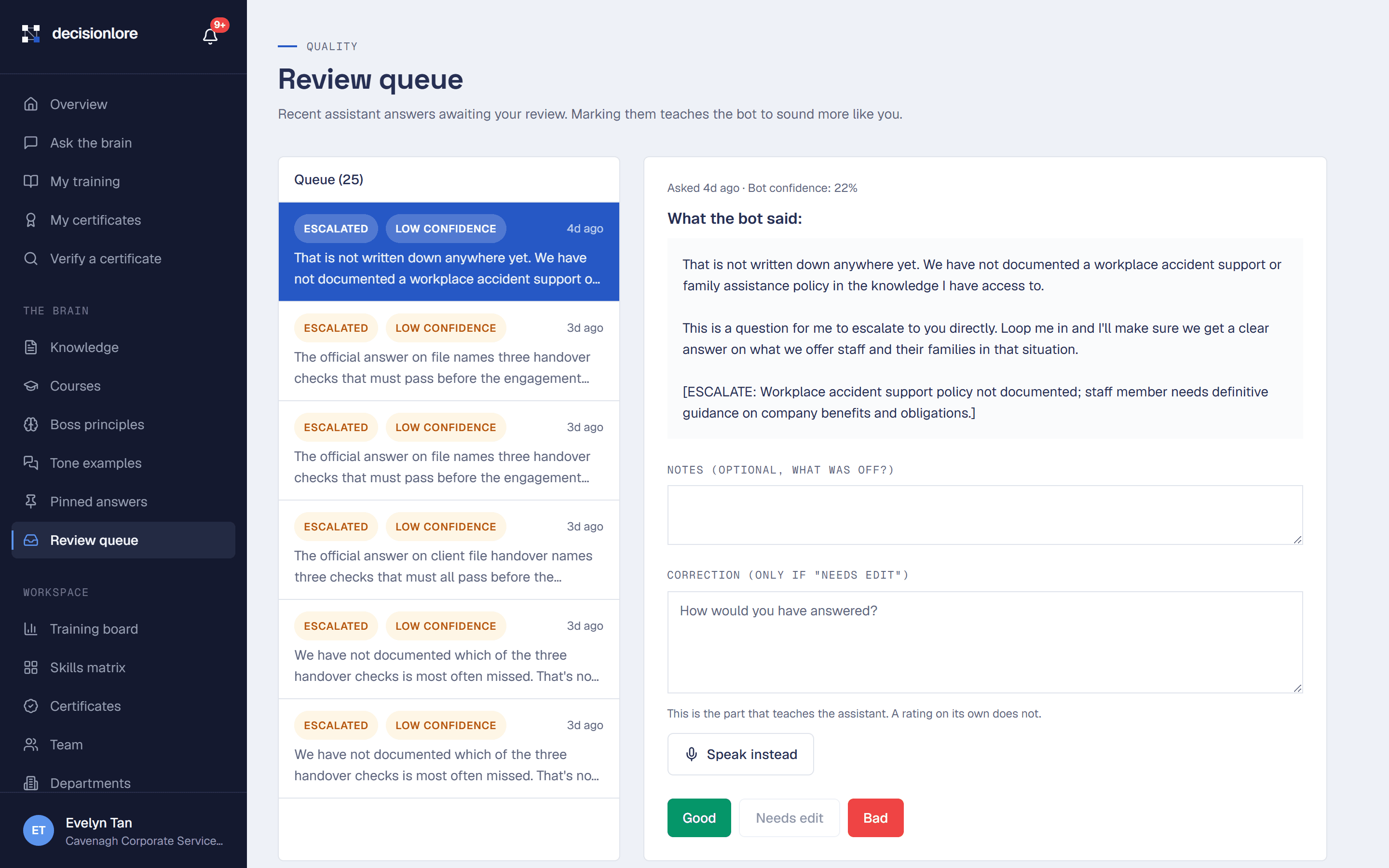
Every answer the bot gave your team that week lands in the review queue. You read through them and mark each one good, bad, or correct it outright. This is the whole mechanism that keeps the brain from going stale: a document dump answers the same way forever, this compounds.
Corrections don't just fix one answer. They sharpen the underlying principles and tone examples the bot draws from, so the same mistake doesn't keep recurring. It's the difference between a static FAQ and a system that's actually still learning from you.
Review queuerecent assistant answers awaiting your review. Marking them teaches the bot to sound more like you.
Compoundingcorrections feed back into principles and tone examples, so the fix generalizes instead of patching one question.
Cadencea short weekly pass, not a rebuild. Most of the heavy lifting happened in the capture workshop.
Turn a document into a course, structured to a named skill.
About 90 minutes for your first course
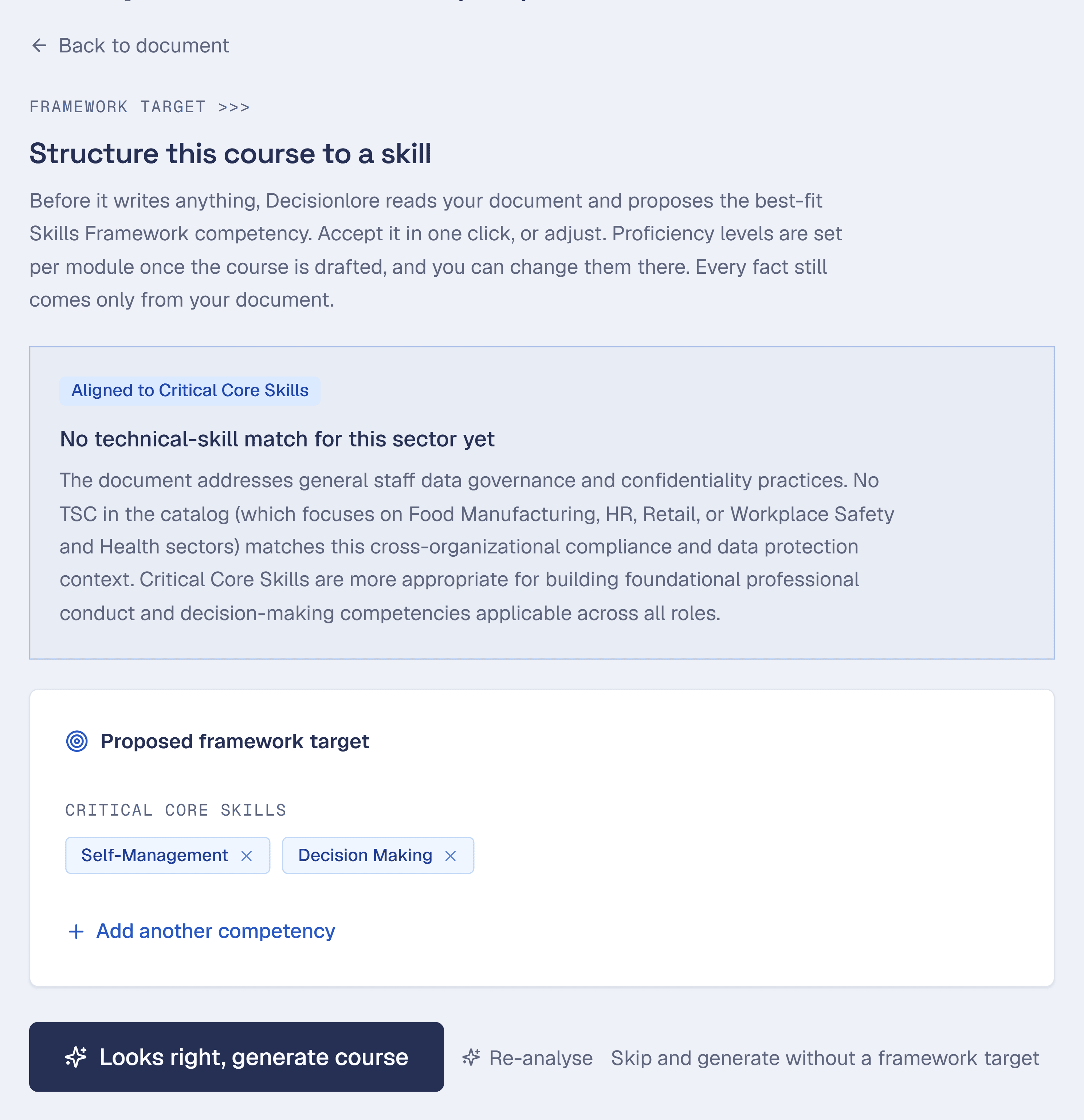
Beyond answering questions, Decisionlore turns your SOPs and training material into short staff courses. When you build one, you pick the Skills Framework competency it covers, a TSC or a CCS, and the proficiency level you want staff to reach. The course and its assessment are structured around that target, so the training has a clear, named goal.
Staff work through the lessons and take a built-in assessment that checks whether they can apply the material, not just recognise it. When they pass, you issue a company certificate of completion in your own name, recording the competency and level the training was structured to. Every completion also updates your skills matrix, so you always know who has been trained and assessed on what.
Skill targetchoose the Skills Framework competency (TSC or CCS) and the proficiency level the course is built to reach.
Assessmenta built-in check that a staff member can apply what they learned, not just click through it.
Company certificateissued in your name on passing, naming the competency and level the training was structured to. This is a company-issued certificate of completion. It is not a WSQ qualification and is not accredited by the Skills and Workforce Development Agency (SWDA).
Skills matrixa live view of which staff have been trained and assessed on which competencies, at which level.
Built for the realities of a 10-50 pax SME.
Available on Starter and Pro plans
The core brain (chat, uploads, principles, the review queue) and AI course generation with quizzes and certificates are available on every plan. As the team grows past a handful of people, Starter and Pro add tagged surfaces below to keep the brain organised and the owner out of the weeds.
DepartmentsGroup your team so Sales asks the Sales brain and Ops asks the Ops brain, without noise between them.
Skills matrixSee which staff have been trained and assessed on which Skills Framework competencies, at which level.
Training boardSee who has passed and who needs help, at a glance.
Audit logEvery meaningful action logged append-only and retained for 12 months.
About how it works.
How long does onboarding (setup) take?
The capture workshop itself is 90 minutes, self-serve on Micro or facilitated on Starter and Pro, plus about a week to upload and process your documents. Once that's done, staff can start asking questions immediately.
How does this reduce new hire time to productivity?
New hires ask the brain directly instead of waiting for a manager to be free, so the questions that used to sit in a Slack thread for a day get answered in seconds, cited to the actual SOP. How much that speeds things up depends on how completely you've captured your SOPs and decision principles in the workshop, not on the software alone.
Can I use this for better generative AI decision making across my team, not just onboarding?
Yes, that's the core use case beyond onboarding: any staff member facing a judgment call (a pricing exception, a client-fit decision) can ask the brain instead of guessing or asking a generic AI tool that doesn't know your rules. Every answer runs a five-point check, cited to a source document, checked against your principles, screened by your do-not-say rules, escalated when confidence is low, and logged, before it reaches anyone.
What happens if the brain doesn't know the answer?
It says so and routes the question to you instead of guessing. That's a deliberate design choice: a wrong answer stated confidently is worse than no answer.
What does 'structured to the Skills Framework' actually mean?
When you build a course, you choose a competency from Singapore's Skills Framework (a TSC or a CCS) and a proficiency level. Decisionlore then structures the course and its assessment around that named target, using your own uploaded material. It means your training points at a recognised national reference for skills, instead of a private idea of what 'trained' means. It does not mean the course is accredited or government-certified.
Is the certificate a WSQ or a government qualification?
No, and we are careful to say so. It is a company-issued certificate of completion. It records which Skills Framework competency and level your training was structured to, and proves the staff member passed your assessment. It is not a WSQ qualification and not a Statement of Attainment, and Decisionlore is not an approved training provider.
Run the workshop.
Keep the result.
14-day pilot. 90 minutes of your time. We run the workshop, and you keep the result, even if you don't subscribe.